Your operation will run 20% more efficient in 12 months or your money back. Applies to the Starter and Professional lifetime licenses.TermsSee both guarantees
For cabling shop owners who can't hire fast enough
Get more from the crew you have
Hiring another tech won't fix a bottleneck that's you: with estimate, project, field and billing on one record, the crew gets more done without routing everything through you.
PathFinder on a sample plant sheet: OM4 from MDF-0's fiber panel A to the switch in each telecom closet, routed in inner duct. PathFinder has no fiber endpoint, so each run ends on a Network Switch symbol with its cable type set.
Replaces 8+ tools
Unlimited users on lifetime licenses
Works offline
What contractors say about CableFi
We used to spend two days on a 400-drop bid. With Auto-Cable and Auto-Bid we're turning them around before the walkthrough is even over. Won three jobs last month we would've passed on.
Marcus DelgadoOperations Manager, Ridgeline Structured Cabling
The cable schedule alone paid for the software. It matches the way we actually label and terminate, not some generic list. Our closeout packages went from a nightmare to a one-click export.
Priya RamaswamyEstimator, Meridian ICT Contractors
Here's the deal
Your next hire might be a system
30-minute live demo
We run one of your real jobs from bid to invoice in CableFi.
A map of the lost hours
See where your crew loses time to re-keying and waiting.
One record per job
Estimate, project, field and billing together, so nobody waits on you.
Room to grow
Unlimited users on the lifetime licenses, so the next tech adds no seat fee.
Two taps: what you install and how big the crew is.
2
Step 2: Your details
Where we send the calendar invite.
3
Step 3: Pick a demo time
Bring how one job flows today. We map where the hours go to re-keying and waiting, then run it in one system.
Leverage, not headcount
The crew works from the same job
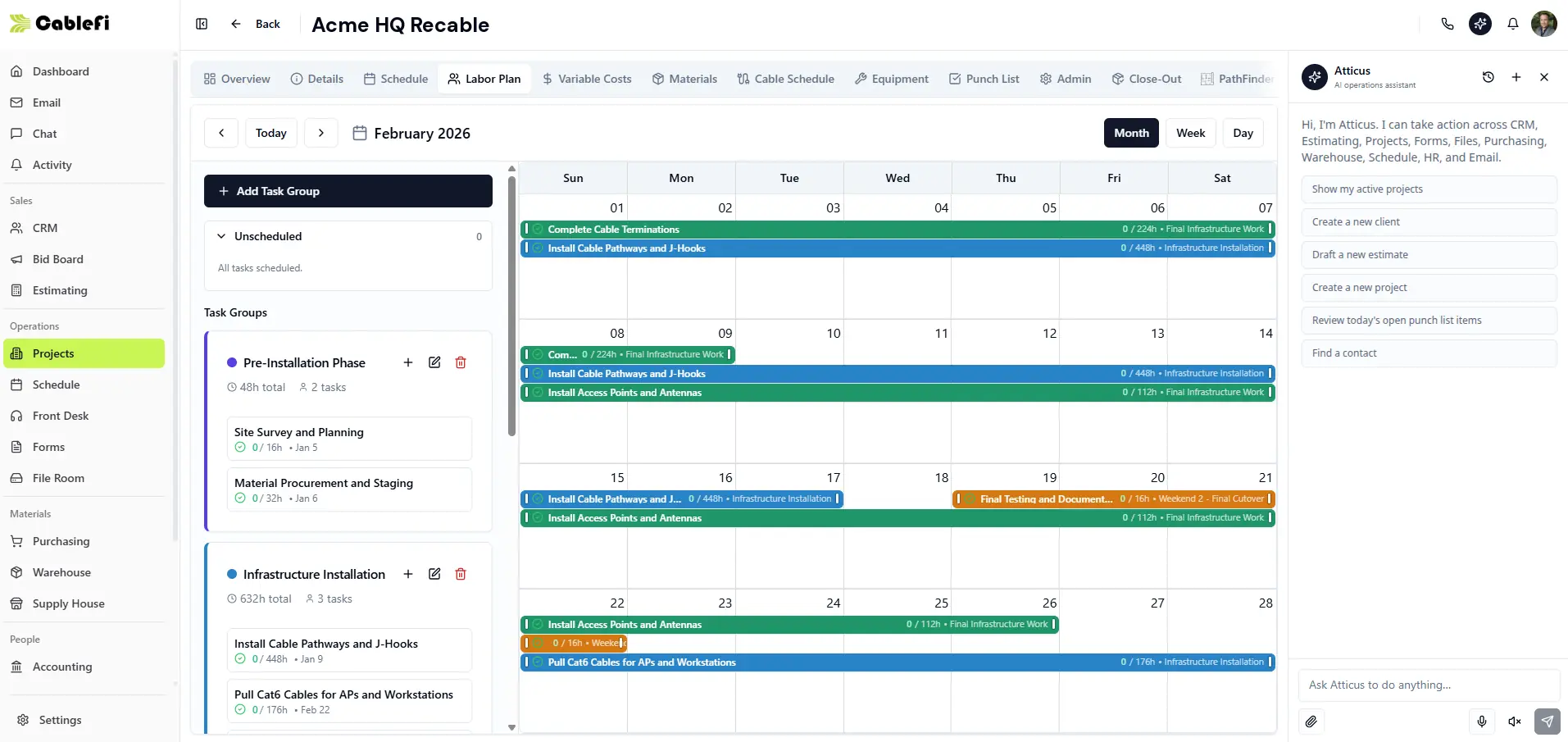
Projects · Labor plan
The labor plan: task groups, hours and who is on which day.
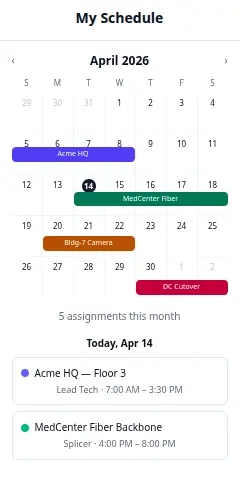
Field app · My schedule
Each tech's jobs, role and hours for today, on the phone.
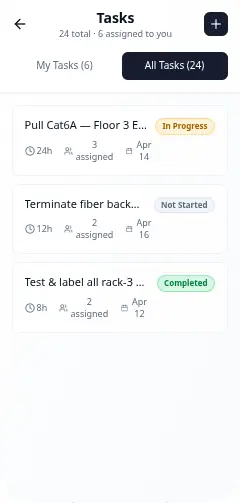
Field app · Tasks
Tasks with hours, who is assigned and the date, without a call to you.
Our two guarantees
Onboarding guarantee
$500
rest of the license, after onboarding
Kickoff30 days
Then the rest of the license, after onboarding.
A $500 deposit starts onboarding and counts toward your license. If you aren't fully satisfied with onboarding and ask within 30 days of kickoff, we refund the full $500. You pay the rest of the license after onboarding, once you're satisfied. Applies to the Starter and Professional lifetime licenses.
12-month efficiency guarantee
Your operation will run 20% more efficient in 12 months or your money back.
Baseline at onboarding12 months later: 20% more efficient
Bid time
Hours per job
Admin hours
Your operation will run 20% more efficient in 12 months or your money back. At onboarding CableFi records your bid time, hours per job and admin hours.
During onboarding we record your baseline: bid time from plans to a sent proposal, hours per job and admin hours. If your operation isn't running at least 20% more efficiently 12 months after kickoff, we refund the license price you paid. Applies to the Starter and Professional lifetime licenses, for shops that run their bids and jobs in CableFi.
Both guarantees come with the Starter and Professional lifetime licenses.
30-minute live demo
Map where your hours go
Growth isn't a hiring problem. It's a leverage problem.
Two quick steps, then pick a time on the calendar.
Step 1 of 3
Your shop
Questions, answered
Is this for a small crew?
Yes. It's built so a small crew gets more done, with estimate, project, field and billing on one record.
What do I bring?
How one job flows today, from bid to invoice. We map where the hours go.
Does the field app need signal?
No. It works offline and syncs when the signal is back.
Do we pay per user as we grow?
No. The lifetime licenses come with unlimited users.
Better leverage beats bigger crews
Bring how one job flows today; we map where the hours go.